
The framework
Short modules, at your own pace
Four on the regulatory framework, three on practice. Stop and resume whenever you like.

Courses / Online
Online course with a voice tutor
A self-paced course on the AI Act, the GDPR, Law 132/2025 and NIS2, applied to what you do every day with AI assistants. A tutor answers you by voice in every module. At the end, the PiirZ anonymiser is yours.

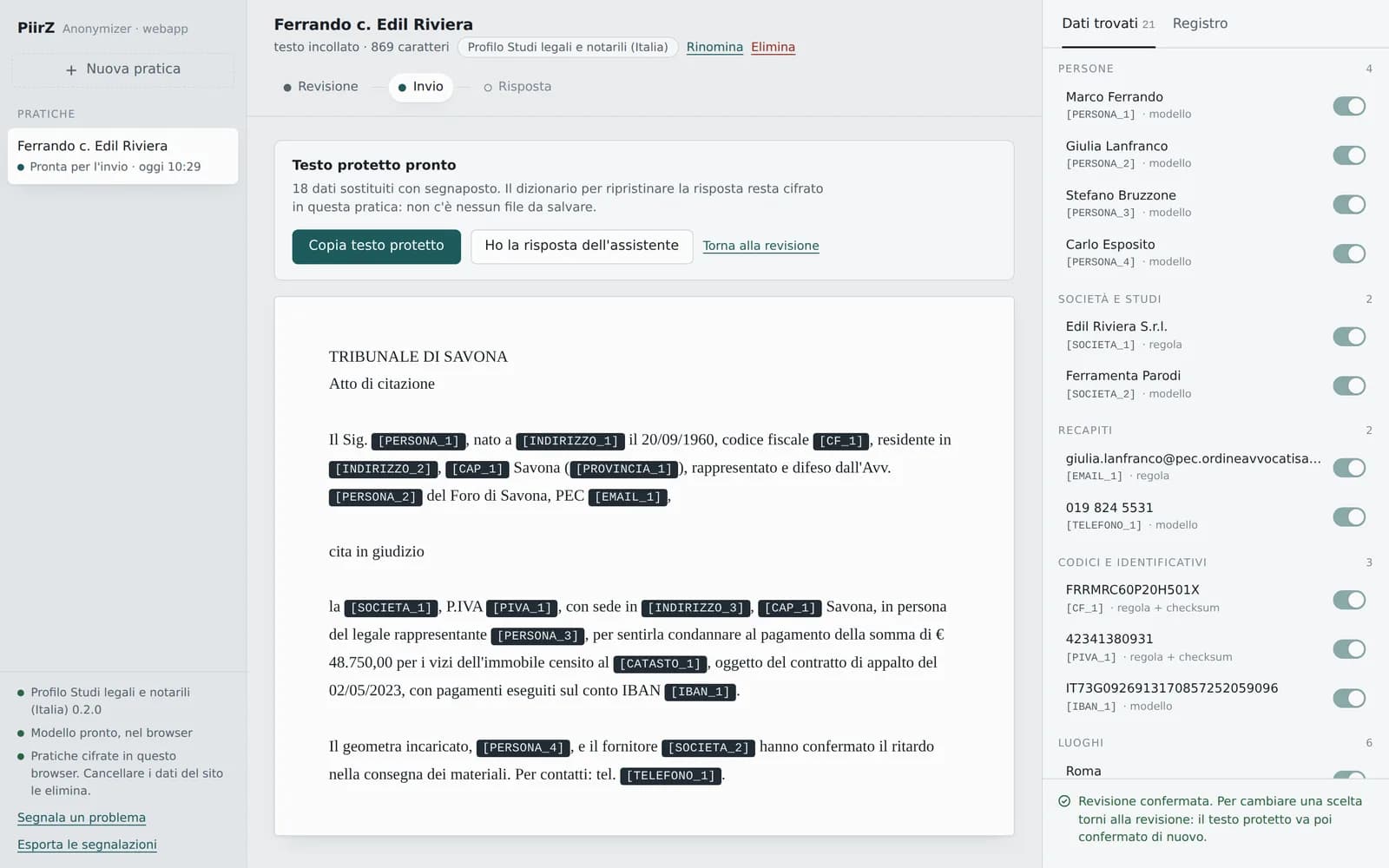
Demonstration example, with invented data.
Rules and principles covered in the course. They are not certifications.
 GDPRPersonal data protectionEU Regulation 2016/679
 NIS2Supply chain securityEU Directive, if it applies to you
 AI ActLiteracy and transparencyEU Regulation 2024/1689
 Law 132/2025AI, workers and clientsItalian law
 Privacy by designProtection built into the workPrinciple, GDPR art. 25
 Internal governanceRoles, rules, controlsOrganisational practice
This is not a future deadline. The rules already apply to anyone who uses AI for work.
Law 132/2025: informing workers and clients about the use of AI
AI Act, art. 4 rewritten: training must be carried out and demonstrated
AI Act, art. 50: transparency on generated content
The real risk
In 2023 some Samsung employees pasted internal code and minutes into a public assistant. No hackers, only habits. The same habits as in every office.
A quote to fix. Inside: the client's name, address, amount, IBAN.
09:12A clause to translate. Inside: the counterparty and the confidential terms.
11:40A difficult email to a colleague. Inside: an absence for health reasons.
15:05Send. And the text is on someone else's servers, on their terms.
15:06What you get
Not a law course. What you need to decide, every time, what may leave and what may not.
The framework
Four on the regulatory framework, three on practice. Stop and resume whenever you like.

The method
The method is applied to a text you really use. Describe the case, the tutor guides you.
The tool
It runs on your computer. It finds the data, replaces it, lets you review, and puts the real values back into the reply.
Voice tutor
In every module you talk to a tutor who knows the content and your answers. It does not give you the solution: it asks the right questions until you find it yourself. If you prefer, write.
A checklist built on your answers, and a dated certificate of completion: the proof that the training was done.
The course
Only what concerns you: the part on supply chain security opens if you work for clients subject to NIS2.
Five questions on role, sector and tools: the course and the tutor adapt to your answers.
Literacy and transparency: the two articles that concern anyone who uses AI at work, with the updated calendar.
What happens to a text when you press send, and why pseudonymised does not mean anonymous.
Italian obligations towards workers and clients. NIS2 only if you work for regulated entities.
Four families of data, the mosaic effect, five questions. Applied to a case of your own, with the tutor.
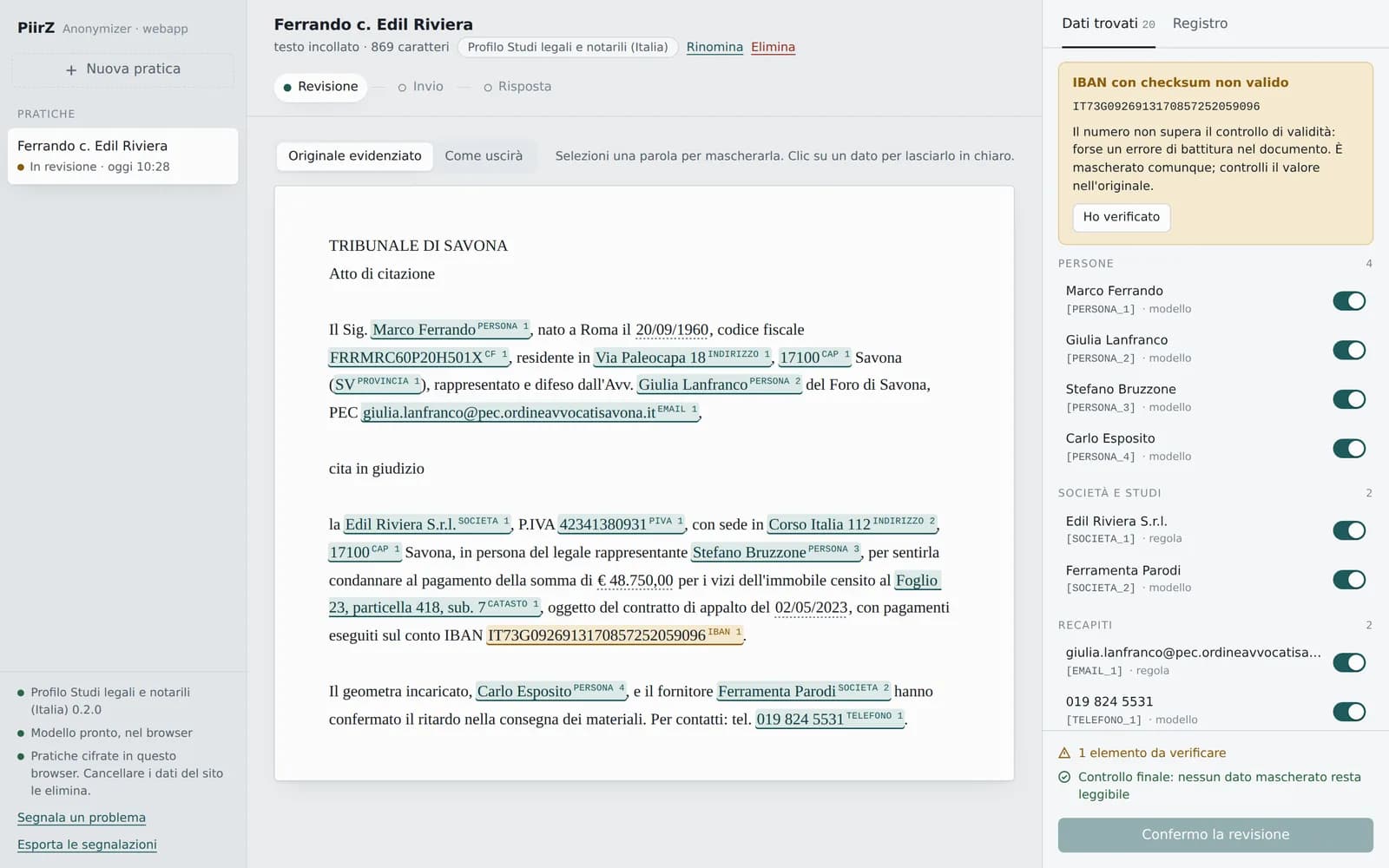
The PiirZ anonymiser in seven annotated screens, from the document to the restored text.
A checklist built on your answers, a certificate of completion, the tool and a guide to download.
The tool
One of the seven annotated screens of module 6. Tap the numbers.
How it works
Pay by card, Apple Pay, Google Pay or PayPal.
An email with access to your private area. No password to remember.
From your computer or phone, with the tutor always available.
At the end of the course: anonymiser, user guide, checklist and certificate.
Prices
The same course, the same tool. With the team plan you assign seats to colleagues and hold an assessment session with PiirZ.
For professionals and owners who want to train themselves.
For firms and small companies. You assign the seats, each person has their own course.
From seat 16 onwards €49 + VAT. Minimum 3 seats.
Prices exclude VAT. Card, Apple Pay, Google Pay and PayPal. VAT is calculated on the payment page according to the country and the VAT number: for companies with a VAT number in another EU country the reverse charge applies. You can also enter a voucher code there.
Questions
There is no fixed duration. The course adapts to your answers and the tutor goes as deep as you ask. You can stop and resume whenever you like: your progress is saved.
Not for the course: an up-to-date browser is enough, on a computer or phone. The anonymiser, which you download at the end, starts on your computer by following the included guide.
The tutor is a virtual assistant based on artificial intelligence, not a person. The audio of the conversation is not recorded. The transcript is kept by the voice service provider for a limited period and then deleted. The tutor must not be used with real data: the same rule the course teaches for any assistant applies to it.
Nowhere. The tool works on your computer and cases stay encrypted in the browser. Nothing reaches PiirZ. The only thing that leaves is the protected text, when you copy it into the assistant yourself.
Article 4 requires adequate literacy measures and the ability to demonstrate them. The completed course, with the dated certificate, is one of these measures. If you have staff, check with your consultant whether specific training on company tools is also needed.
Choose how many seats you need. One seat is yours; the others you assign from the private area by entering each colleague's email, and they receive their own access link. The plan includes an online assessment and orientation session with the PiirZ team: together we look at how your organisation uses AI today and where it makes sense to start. You book it after purchase, whenever you prefer.
Before you press send